Dictionary
Pick a word while reading and see its definition, from a StarDict dictionary on the SD card.
Korean lookup since firmware 1.6.5-ko.10 · Screens from an X3
How to use
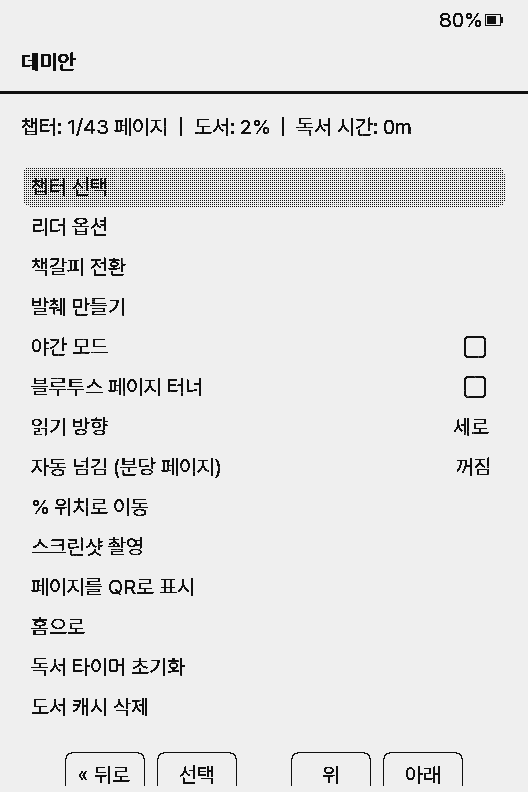
- Make one folder per dictionary in
/dictionaries/on the SD card and put its files there, e.g./dictionaries/stdict/stdict.ifo. - Pick it in Settings → Reader → Dictionary. The setting only appears when a usable dictionary folder exists.
- While reading, press Confirm to open the reader menu and choose Look Up.
- Move the highlight with Left and Right (the side Up and Down buttons jump lines) and press Confirm to look it up. Back returns to the book.
The first lookup shows Indexing dictionary... and writes index files (.qidx, .sidx) next to the dictionary. Large dictionaries take a few seconds; later lookups are quick. The index files can be deleted and are rebuilt.
The definition screen shows the matched headword at the top and the definition below. Turn pages of a long one with Left and Right or the side Up and Down buttons.
Set Settings → Controls → Long-Press Menu to Dictionary to start picking a word by holding Confirm on the page.
.idx and a .dict (or .dict.dz); .ifo and a .syn synonym file are used when present. A .idx.gz does not work, so unpack it with gzip -d first.Korean words
Pick a word as it appears on the page. When the exact form isn't found, the reader drops particles and endings and tries the base form a Korean dictionary lists.
| What changes | Examples |
|---|---|
| Particles | 사랑을 → 사랑, 학생들이 → 학생, 집에 → 집 |
| Verb and adjective base form | 먹었다 → 먹다, 공부했다 → 공부하다, 간다 → 가다 |
| Irregulars | 아름다운 → 아름답다, 몰라 → 모르다, 파란 → 파랗다, 드문 → 드물다 |
Standard Korean Dictionary
Firmware releases carry the National Institute of Korean Language's Standard Korean Language Dictionary (표준국어대사전), converted to StarDict for the reader: 287,761 words with part of speech, Hanja and definitions.
- Unzip it and copy the
stdictfolder into/dictionaries/on the SD card, so it has/dictionaries/stdict/stdict.ifo. - Pick 표준국어대사전 in Settings → Reader → Dictionary.
- The first lookup indexes it once. It is about 21 MB unpacked, so this takes a moment.
Source: 국립국어원 표준국어대사전, CC BY-SA 2.0 KR. Anything built from it carries the same license (LICENSE.txt in the folder).
Usage examples are left out: those quoted from books and newspapers are not under the open license, and short entries suit the small screen.
Build it yourself
To rebuild from newer data, use build_korean_dictionary.py in the firmware repository. It needs only the Python 3 standard library.
- Sign in at stdict.korean.go.kr, open 내 정보 관리 → 사전 내려받기, and press 전체 내려받기 for the XML ZIP. The spellcheck-ko/korean-dict-nikl repository keeps the same files in its
stdictfolder. - Run the script from the firmware repository on the ZIP (or the folder of XML files). It takes about 20 seconds.
- Copy
out/stdictto/dictionaries/stdicton the SD card.
python3 scripts/build_korean_dictionary.py stdict.zip out/stdictWhat goes in
- Single words only. Phrases, idioms and proverbs cannot be picked as one word on the page, and affixes and endings (
-ㄴ가,개-) are left out. - Headword markup is removed: homograph numbers (
사과01→사과) and the marks for word parts and optional spaces (공부-하다→공부하다). - All homographs and senses of a headword become one entry, numbered
[1],[2], with part of speech (「명사」) and Hanja. - Usage examples are dropped.
Other dictionaries
Any StarDict dictionary (.ifo, .idx, .dict) works, in any language. Some places to find them:
- reader.dict: monolingual dictionaries for many languages, built from Wiktionary
- WikDict: bilingual dictionaries from Wiktionary (StarDict files)
- Vuizur/Wiktionary-Dictionaries: many languages to English, English-English included
- FireDict's list of free dictionaries
Dictionaries with idxoffsetbits=64 in the .ifo are not supported. A folder holding more than one dictionary is skipped.